Respond to meeting invitations

Modified on Tue, 14 Oct at 10:23 AM

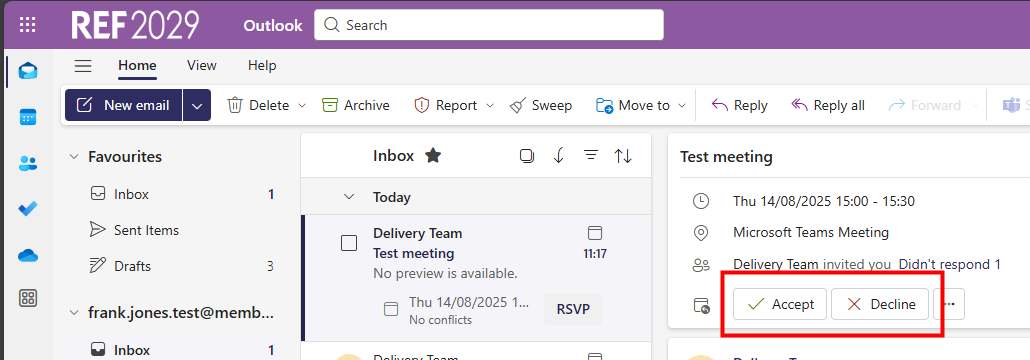
The REF team send out invitations to panel meetings and these will appear in your email inbox as a meeting invite. 


All official REF meetings will be sent by the REF Delivery team. Please do not forward official REF meetings on to any additional recipients (either externally or within the REF Hub). Contact admin@ref.ac.uk if you need to add any additional attendees. 


Please check your REF email on a regular basis for meeting invitations and when you receive one: 

  • please respond to the meeting invite as soon as possible, using the Accept or Decline button, to let us know whether you will be attending or not. This is vital for in-person meetings so we can make arrangements for all accommodation and catering requirements

  • the REF team will send you a separate email so you can request accommodation, if needed, and let us know of any special requirements you may have 

  • you can forward these invitations to your own organisation email so that the meeting details appear in your calendar or you can set up a rule to automatically forward them

  • however, you must sign on to your REF account to join a virtual meeting. You cannot join a meeting from your organisation calendar. 

  • please do not forward the meeting invites on to anyone else, (other than your organisation email address). These are formal REF meetings so all invitations are managed by the REF team 

  • if you think someone else should be attending the meeting please contact admin@ref.ac.uk from your REF account


We want to make these articles as helpful as possible so please use the Yes/No buttons below to send us feedback.

Was this article helpful?

That’s Great!

Thank you for your feedback

Sorry! We couldn't be helpful

Thank you for your feedback

Let us know how can we improve this article!

Select at least one of the reasons
CAPTCHA verification is required.

Feedback sent

We appreciate your effort and will try to fix the article